
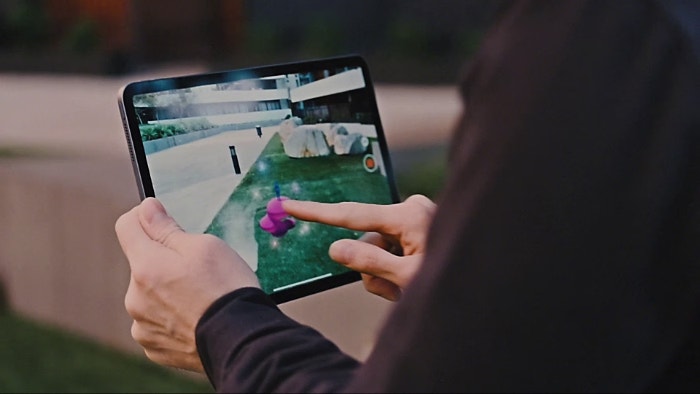
Augmented Reality for Creating Interactive Presentations: Elevate Engagement & Impact
Are you looking to revolutionize your presentations and leave an unforgettable impression? In today's competitive landscape, static slides simply don't cut it. Enter augmented reality (AR) for creating interactive presentations – a game-changing technology that transforms passive viewing into a dynamic, immersive experience. This comprehensive guide will explore how AR can elevate your content, captivate your audience, and deliver unparalleled impact, providing you with the insights to harness this powerful tool for next-generation communication.
The Paradigm Shift: From Passive Viewing to Immersive Engagement with AR
Traditional presentations often struggle to maintain audience attention beyond the initial few minutes. The human brain craves novelty and interaction. This is precisely where augmented reality steps in, offering a solution that goes far beyond static visuals. By overlaying digital information onto the real world, AR transforms the presentation environment itself into an interactive canvas. Imagine showcasing a new product by allowing your audience to virtually examine its 3D model from all angles, or illustrating complex data through an animated, spatial visualization that appears right in front of them.
The power of AR presentations lies in their ability to create a sense of presence and direct engagement. Instead of merely telling, you are showing in a way that allows the audience to participate actively in the narrative. This not only enhances comprehension but also significantly boosts retention and emotional connection. It's about moving from a one-way broadcast to a multi-sensory, two-way dialogue, making every presentation a memorable event rather than a forgettable lecture. This shift is critical for anyone looking to truly stand out in fields ranging from corporate training to sales pitches and educational instruction.
Key Benefits of Integrating AR into Your Presentations
- Unparalleled Engagement: AR captures attention immediately and sustains it by offering novel, interactive elements. Audiences aren't just watching; they're experiencing.
- Enhanced Comprehension: Complex concepts become easier to grasp when presented as interactive 3D models or spatial data visualizations. For instance, explaining the intricate mechanics of an engine or the layered structure of a cell becomes intuitive with an AR overlay.
- Memorable Experiences: The novelty and interactivity of AR leave a lasting impression, ensuring your message resonates long after the presentation ends. This contributes significantly to brand recall and information retention.
- Dynamic Storytelling: AR allows for non-linear, exploratory narratives. Audiences can choose their path through information, making the story more personal and impactful. This is particularly effective for immersive storytelling.
- Increased Interactivity: Attendees can manipulate virtual objects, explore scenarios, or even collaborate within the AR environment, fostering active participation.
- Competitive Differentiation: Adopting AR technology showcases innovation and forward-thinking, setting you apart from competitors who rely on conventional methods.
Core Technologies and Components for AR Presentations
Understanding the underlying technologies is crucial for effectively leveraging augmented reality for creating interactive presentations. While the field is rapidly evolving, several core components are typically involved:
Hardware Considerations for Immersive AR Experiences
The hardware chosen significantly impacts the user experience. For casual, widespread access, smartphone and tablet-based AR remains the most accessible entry point. However, for truly immersive and hands-free experiences, dedicated AR headsets are gaining traction.
- Smartphones & Tablets: Utilized through native camera apps or dedicated AR applications. They are ubiquitous and require no special equipment for the audience, making them ideal for broad reach. Popular frameworks like ARKit (iOS) and ARCore (Android) power these experiences.
- AR Headsets (e.g., Microsoft HoloLens, Magic Leap): These devices offer a more truly spatial computing experience, overlaying digital content directly into the wearer's field of vision. While still specialized and more expensive, they provide an unparalleled level of immersion and interactivity for smaller, dedicated audiences or specific industry applications.
- Projector-Based AR: Less common for personal interaction but can create large-scale interactive environments, projecting AR elements onto surfaces for group experiences.
Software & Content Creation Tools for Dynamic Presentations
The magic of AR truly comes alive through specialized software and content creation platforms. These tools enable designers and presenters to build, animate, and deploy their interactive AR experiences.
- 3D Modeling Software: Tools like Blender, Autodesk Maya, or SketchUp are essential for creating the virtual objects, characters, and environments that will be overlaid into the real world. High-quality 3D models are the foundation of compelling AR content.
- AR Development Platforms/SDKs: Unity and Unreal Engine, combined with AR SDKs (ARKit, ARCore, Vuforia, WebAR frameworks), are the primary environments for building robust AR applications. They allow for complex interactions, animations, and integration with real-world tracking.
- No-Code/Low-Code AR Platforms: For users without extensive coding knowledge, platforms like Artivive, ZapWorks, or various web-based AR builders offer simplified interfaces to create basic AR experiences quickly, often by linking triggers (like images) to digital content (videos, 3D models, animations).
- Presentation Software Integration: Some advanced presentation tools are beginning to integrate basic AR capabilities or allow embedding of AR experiences, streamlining the workflow.
Designing Compelling AR Content for Maximum Impact
Simply adding AR elements isn't enough; the content must be thoughtfully designed to maximize its potential. The goal is to enhance, not distract, from your core message.
Strategies for Effective AR Content Integration
- Define Your Objective: Before diving into design, clearly articulate what you want your AR elements to achieve. Is it to simplify a complex process, showcase a product, or engage a specific emotion?
- Keep it Relevant: AR should serve the content, not overwhelm it. Every AR element should add value and directly support your narrative. Avoid gratuitous effects.
- Optimize for Performance: Large, unoptimized 3D models or complex animations can lead to lag and a poor user experience. Optimize assets for various devices and network conditions.
- Intuitive Interaction: Design interactions that are natural and easy for the audience to understand, whether it's tapping, swiping, or walking around a virtual object. Consider the user's familiarity with AR.
- Contextual Triggers: Use physical markers (images, QR codes, specific locations) or markerless tracking (surface detection) effectively to trigger AR content at the right moment. For example, a business card could trigger an interactive portfolio, or a product brochure could launch an AR demonstration.
Practical Applications and Use Cases
The versatility of augmented reality for creating interactive presentations spans numerous sectors:
- Product Demonstrations: Allow potential customers to virtually "try on" clothes, explore the interior of a car, or disassemble a complex machine in 3D. This is invaluable for sales pitches.
- Educational Tools: Bring anatomy, historical sites, or scientific phenomena to life in the classroom. Students can interact with virtual dinosaurs, explore the solar system, or conduct virtual experiments. This transforms educational technology.
- Business Communication & Training: Visualize complex data, simulate scenarios for training, or provide interactive walkthroughs of new office layouts. For business communication, this means clearer, more engaging reports.
- Architecture & Design: Present building models, interior designs, or landscape plans as interactive, scale models in real-time within the client's space.
- Art & Entertainment: Create interactive art installations or enhance live performances with dynamic digital overlays.
Overcoming Challenges and Best Practices for Successful AR Presentations
While the potential of AR is immense, successful implementation requires careful planning and consideration of potential hurdles.
Common Challenges to Address
- Technical Complexity: Developing sophisticated AR experiences can require specialized skills in 3D modeling, programming, and user experience design.
- Hardware Accessibility: While smartphones are common, ensuring all audience members have compatible devices and sufficient battery life can be a challenge. Dedicated AR headsets are still niche.
- Connectivity Issues: Streaming high-quality AR content, especially with real-time data visualization, requires stable internet access.
- User Adoption & Familiarity: Some audience members may be new to AR, requiring clear instructions and intuitive interfaces to ease them into the experience.
- Cost of Development: High-end custom AR experiences can be expensive to develop, though more accessible tools are emerging.
Expert Tips for Maximizing Your AR Presentation's Impact
- Start Simple, Scale Up: Begin with straightforward AR elements to get comfortable, then gradually introduce more complex interactions as your expertise grows.
- Test Thoroughly: Always test your AR experience on various devices and in different environments to ensure smooth performance and optimal tracking.
- Provide Clear Instructions: Guide your audience on how to interact with the AR content. A brief tutorial or on-screen prompts can make a big difference for user experience (UX).
- Integrate, Don't Replace: AR should complement your verbal presentation, not overshadow it. Use it to illustrate key points, not as a standalone show.
- Design for the Environment: Consider the lighting, space, and potential distractions in your presentation venue. AR tracking performs best in well-lit, uncluttered environments.
- Iterate Based on Feedback: Gather feedback from early users and refine your AR content. Continuous improvement is key to effective content creation.
The Future of Presentations: Augmented Reality and Beyond
The trajectory of augmented reality for creating interactive presentations points towards an even more integrated, intuitive, and powerful future. As AR hardware becomes lighter, more powerful, and more affordable, and as development tools become more user-friendly, the barrier to entry will continue to lower.
We can anticipate a future where AR is seamlessly integrated into standard presentation software, allowing anyone to drag and drop 3D assets or interactive elements directly into their slides. The lines between physical and digital will blur further, leading to truly mixed reality experiences where presenters and audiences collaborate within shared virtual spaces that overlay their real surroundings. Imagine conducting a global business meeting where participants from different continents are virtually present in the same room, interacting with shared 3D models and real-time interaction data points.
Furthermore, the convergence with artificial intelligence (AI) will enable AR presentations to become even more adaptive and personalized. AI could analyze audience reactions in real-time, dynamically adjusting the AR content to maintain engagement or clarify points. This represents the next frontier in digital transformation within communication, promising presentations that are not just seen, but truly lived.
To stay ahead, consider exploring platforms that offer easy integration of AR elements or experimenting with entry-level AR creation tools. The shift towards immersive technologies is not just a trend; it's the evolution of how we communicate, teach, and sell.
Frequently Asked Questions
What is augmented reality in the context of presentations?
Augmented reality (AR) in presentations refers to the use of digital overlays, such as 3D models, animations, or interactive data visualizations, that are superimposed onto the real-world environment viewed through a device (like a smartphone, tablet, or AR headset). This transforms a static presentation into a dynamic, interactive AR experience, allowing the audience to engage with content in a spatial and immersive way, rather than just viewing it on a flat screen.
How does AR enhance audience engagement in presentations?
AR significantly enhances audience engagement by transforming passive viewing into active participation. Instead of simply looking at slides, attendees can manipulate 3D objects, walk around virtual models, or interact with data visualizations that appear in their physical space. This novelty, interactivity, and direct involvement capture attention, boost comprehension, and create a more memorable and emotionally resonant experience, fostering a deeper connection with the presented content.
What software and tools are commonly used to create AR presentations?
Creating AR presentations often involves a combination of tools. For 3D content, software like Blender, Maya, or SketchUp is used. For building the AR experience itself, popular development platforms include Unity and Unreal Engine, often integrated with AR SDKs like ARKit (for iOS), ARCore (for Android), and Vuforia. For users without coding expertise, no-code/low-code platforms such as Artivive, ZapWorks, or various web-based AR builders offer simplified ways to create and deploy AR experiences.
Is augmented reality suitable for all types of presentations?
While augmented reality for creating interactive presentations offers immense benefits, it's not universally suitable for every type of presentation. It shines brightest when there's a need to visualize complex 3D objects, demonstrate processes, tell an immersive story, or provide interactive data insights. For very simple, text-heavy presentations, the added complexity and cost of AR might not be justified. However, for sales pitches, educational lectures, product launches, or technical demonstrations, AR can be a transformative tool that significantly elevates impact and understanding.

0 Komentar