
The Ultimate Guide to the Best Tablets for Note-Taking and Studying in 2024
Are you a student, researcher, or professional looking to revolutionize your learning and organization? Discovering the best tablets for note-taking and studying is a game-changer for academic performance and professional development. This comprehensive guide delves deep into the features, benefits, and top contenders in the tablet market, ensuring you make an informed decision to elevate your digital note-taking and study habits. From capturing handwritten notes with incredible precision to managing complex research papers, the right tablet can transform your educational journey, offering unparalleled portability and functionality.
Why a Tablet is Indispensable for Modern Learning and Note-Taking
In today's fast-paced educational environment, traditional notebooks and textbooks are increasingly being replaced by versatile digital devices. Tablets offer a unique blend of portability, power, and interactive features that make them ideal for students and lifelong learners. The ability to carry an entire library, annotate documents, and organize notes seamlessly on a single device provides a significant advantage.
Key Advantages of Using a Tablet for Study
- Enhanced Organization: Keep all your notes, textbooks, and research materials in one searchable, organized place. No more lost papers or heavy backpacks.
- Interactive Learning: Utilize educational apps, multimedia content, and interactive simulations to deepen understanding.
- Sustainability: Reduce paper consumption, contributing to a more eco-friendly study routine.
- Flexibility and Portability: Study anywhere, anytime. Tablets are lightweight and easy to carry, perfect for lectures, library sessions, or on-the-go review.
- Dynamic Note-Taking: Combine handwritten notes with typed text, diagrams, images, and even audio recordings for comprehensive learning.
- Cloud Synchronization: Easily back up and access your notes across multiple devices, ensuring your work is always safe and accessible.
Essential Features for the Optimal Note-Taking and Study Tablet
Not all tablets are created equal when it comes to serious academic use. To truly excel in digital note-taking and studying, specific features become paramount. Understanding these will guide you towards selecting a device that truly meets your needs.
Stylus Performance and Precision
The stylus is the heart of a great note-taking tablet. Look for a device with an active digitizer and a high-quality stylus (like the Apple Pencil, Samsung S Pen, or Surface Pen). Key aspects include:
- Pressure Sensitivity: Allows for varied line thickness, crucial for drawing diagrams, sketching, and replicating natural handwriting.
- Palm Rejection: Prevents accidental marks from your hand resting on the screen while writing. This is non-negotiable for comfortable, uninterrupted note-taking.
- Low Latency: Minimizes the delay between the stylus movement and the appearance of the line on screen, making the writing experience feel natural and responsive.
- Tilt Support: Offers shading capabilities, beneficial for art students or those who like to add artistic flair to their notes.
Display Quality and Size
A superior display is vital for comfortable viewing during long study sessions. Consider:
- Resolution: A higher resolution (e.g., 2000x1200 pixels or better) provides sharper text and images, reducing eye strain.
- Screen Size: Tablets typically range from 8 to 13 inches. Larger screens (11-13 inches) are excellent for split-screen multitasking, reading PDFs, and detailed note-taking. Smaller screens offer greater portability.
- Brightness and Color Accuracy: Important for reading in various lighting conditions and for subjects requiring visual precision.
Battery Life for All-Day Productivity
Imagine your tablet dying in the middle of a crucial lecture. For students, battery longevity is a critical factor. Aim for tablets offering at least 8-10 hours of real-world usage on a single charge to ensure you can get through a full day of classes and study without constantly searching for an outlet.
Storage and Performance
Your tablet needs enough muscle to handle demanding apps and store vast amounts of data.
- RAM: 4GB RAM is a minimum, but 6GB or 8GB will ensure smoother multitasking and better performance with resource-intensive apps.
- Processor: A fast processor ensures apps launch quickly and run without lag, crucial for seamless transitions between note-taking, research, and multimedia.
- Internal Storage: 128GB is a good starting point, especially if you plan to download many textbooks, lecture recordings, and apps. Consider models with higher storage or expandable options if you foresee extensive media consumption or large files.
Operating System and App Ecosystem
The OS dictates the apps available and the overall user experience.
- iPadOS (Apple): Known for its vast selection of high-quality educational apps, intuitive interface, and excellent stylus integration (Apple Pencil). Ideal for creative fields and those seeking a premium, reliable experience.
- Android (Samsung, Lenovo, etc.): Offers more customization and often greater affordability. The app ecosystem is vast, though some note-taking apps might not be as optimized as their iOS counterparts. Good for users who prefer open systems and diverse hardware options.
- Windows (Microsoft Surface): Essentially a full-fledged PC in tablet form. Offers unparalleled versatility for running desktop software, making it ideal for engineering, coding, or specific professional applications. The stylus experience is also robust.
Portability and Build Quality
Your tablet will be carried daily, so portability factor and durability are important. Look for lightweight designs, premium materials, and robust construction that can withstand the rigors of student life. Consider protective cases and screen protectors as essential accessories.
Top Contenders: The Best Tablets for Note-Taking and Studying
Based on the essential features outlined, here are the leading tablets that consistently deliver exceptional experiences for note-taking and academic pursuits.
Apple iPad Series (Pro, Air, Mini, Standard)
Apple iPads, especially when paired with the Apple Pencil, are often considered the gold standard for digital note-taking. Their intuitive iPadOS, vast app ecosystem, and seamless hardware-software integration make them incredibly powerful study tools.
- iPad Pro: The ultimate choice for power users, offering the best display, M-series chips for desktop-level performance, and exceptional Apple Pencil support. Ideal for demanding tasks, creative work, and extensive multitasking.
- iPad Air: A fantastic mid-range option that balances performance, portability, and price. It supports the Apple Pencil 2 and features a powerful chip, making it excellent for most students.
- iPad (Standard): The most affordable entry point, still offering solid note-taking capabilities with Apple Pencil 1 support. Great for budget-conscious students who need reliable performance for basic tasks.
- iPad Mini: Highly portable, perfect for quick notes, reading, and on-the-go learning. Its smaller size might be less ideal for extensive split-screen multitasking or large diagrams.
Consider linking to: Essential Apple iPad Accessories for Students
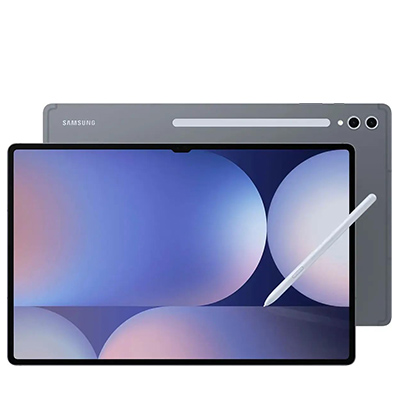
Samsung Galaxy Tab S Series
Samsung's flagship Android tablets are formidable competitors, offering vibrant AMOLED displays, powerful performance, and the included S Pen stylus. Their DeX mode transforms the tablet into a desktop-like environment, enhancing productivity.
- Galaxy Tab S9 Ultra/S9+/S9: These premium tablets offer stunning screens, top-tier performance, and the S Pen comes included in the box. Excellent for students who value a vibrant display, powerful multitasking, and Android's flexibility. The Ultra's large screen is perfect for extensive note-taking and media consumption.
- Galaxy Tab S9 FE/FE+: More budget-friendly options that still provide a great S Pen experience and solid performance for most academic needs.
The S Pen's natural feel and Samsung's robust note-taking apps (like Samsung Notes) make these devices highly effective for handwriting recognition and digital organization.
Microsoft Surface Series (Pro, Go, Laptop Studio)
Microsoft Surface devices blur the line between tablet and laptop, running full Windows. This makes them incredibly versatile for students who need to run desktop software for specific courses (e.g., engineering, coding, design).
- Surface Pro: A powerful 2-in-1 device with a kickstand and detachable keyboard cover, making it highly adaptable. Supports the Surface Pen with excellent precision and low latency. Ideal for students who need the full power of Windows and robust note-taking capabilities.
- Surface Go: A more compact and affordable option, perfect for lighter academic loads and extreme portability. Still runs Windows, offering flexibility for essential desktop apps.
- Surface Laptop Studio: While primarily a laptop, its unique hinge allows it to transform into a powerful tablet, making it an excellent choice for art, design, or architecture students who need both a powerful PC and a large, precise drawing surface.
The ability to run Microsoft Office Suite natively and integrate seamlessly with OneDrive for cloud synchronization is a major advantage.
ReMarkable 2
For those who prioritize a distraction-free, paper-like writing experience above all else, the ReMarkable 2 stands out. It's an e-ink tablet designed purely for note-taking, reading, and annotating PDFs.
- Pros: Unparalleled writing feel, exceptional battery life, no distractions (no apps, no notifications), extremely lightweight.
- Cons: Lacks color, limited functionality beyond notes and PDFs, no app store, higher price for a niche device.
It's the ultimate tool for traditionalists embracing digital, focusing purely on digital note-taking and reading without the temptations of a full-fledged tablet.
Optimizing Your Tablet for Academic Success
Acquiring the right tablet is just the first step. Maximizing its potential requires leveraging the right software and strategies.
Essential Note-Taking and Study Apps
The app ecosystem is crucial for any student tablet. Here are some top recommendations:
- Notability (iOS/iPadOS): A favorite for many students, offering excellent handwriting capabilities, audio recording synced with notes, and PDF annotation.
- GoodNotes (iOS/iPadOS): Another powerful option known for its beautiful digital notebooks, robust PDF annotation, and flexible organization.
- Microsoft OneNote (Cross-Platform): Free and highly versatile, allowing you to create notebooks with infinite canvas space, embed multimedia, and sync across all devices. Great for collaborative projects.
- Evernote (Cross-Platform): Excellent for capturing and organizing web clips, articles, and quick notes. While not primarily a handwriting app, its organizational features are top-tier.
- LiquidText (iOS/iPadOS/Windows): Revolutionary for research, allowing you to pull excerpts from multiple documents onto a single workspace, link ideas, and create mind maps.
Effective Study Strategies with Your Tablet
Integrate your tablet into your study routine for maximum impact:
- Leverage Split-Screen Multitasking: View lecture slides on one side and take notes on the other. Or have your textbook open while working on assignments.
- Create Digital Flashcards: Use apps like Anki or Quizlet to create interactive flashcards for active recall and spaced repetition.
- Mind Mapping and Brainstorming: Use apps like MindNode or Freeform to visually organize ideas, concepts, and study plans.
- Annotate Everything: Mark up PDFs of textbooks, research papers, and lecture slides directly on your tablet.
- Record Lectures (with permission): Sync audio recordings with your notes in apps like Notability, allowing you to revisit explanations precisely when you need them.
- Utilize Cloud Synchronization: Ensure all your notes and documents are automatically backed up to services like iCloud, Google Drive, or OneDrive. This protects against data loss and enables seamless access from any device.
Accessories That Enhance Learning
Beyond the tablet and stylus, certain accessories can significantly improve your study experience.
- Keyboard Cases: For essays, research papers, and extensive typing, a good keyboard case (like Apple's Magic Keyboard or Samsung's Book Cover Keyboard) can transform your tablet into a capable laptop.
- Screen Protectors: A matte, paper-like screen protector can enhance the writing feel, reduce glare, and protect your screen from scratches.
- Portable Chargers/Power Banks: Extend your battery longevity, especially useful during long days away from power outlets.
- USB-C Hubs: Expand connectivity for external drives, monitors, and other peripherals, turning your tablet into a more versatile workstation.
For Apple iPad users, specifically, consider the Smart Folio or Magic Keyboard for enhanced typing and protection. The Apple Pencil (2nd Gen for newer iPads) is absolutely essential for optimal note-taking.
Choosing the Right Tablet for YOUR Academic Needs
The "best" tablet is ultimately subjective and depends on your individual circumstances, field of study, and budget.
- Budget Considerations: Tablets range from a few hundred dollars to over a thousand. Determine your budget first, then explore options within that range. Remember to factor in the cost of the stylus and any essential accessories.
- Field of Study:
- Art/Design/Architecture: Prioritize excellent stylus precision, large, color-accurate displays, and powerful processors (e.g., iPad Pro, Surface Pro, Galaxy Tab S series).
- Humanities/Law: Focus on comfortable reading, strong PDF annotation, and robust organizational features (e.g., any iPad, Galaxy Tab S, ReMarkable 2).
- STEM (Science, Tech, Engineering, Math): May benefit from full desktop OS capabilities for specific software (Microsoft Surface), combined with strong stylus support for diagrams and equations.
- Personal Preferences: Do you prefer iOS, Android, or Windows? Are you comfortable with a more open system, or do you prefer the curated experience of Apple? Test out devices in person if possible to get a feel for them.
Investing in a high-quality tablet for note-taking and studying is an investment in your academic performance and student productivity. By carefully considering the features and your specific needs, you can select a device that will serve as a powerful companion throughout your educational journey.
Frequently Asked Questions
Is an iPad truly the best for note-taking and studying?
While often considered a top contender, whether an iPad is "the best" depends on individual needs. iPads, particularly when paired with the Apple Pencil, offer an exceptionally fluid and responsive digital note-taking experience due to low latency and a highly optimized app ecosystem (e.g., Notability, GoodNotes). However, Samsung Galaxy Tabs with the S Pen and Microsoft Surface devices with their pens also provide excellent experiences, with the latter offering the versatility of a full Windows OS. For pure, distraction-free handwriting, the ReMarkable 2 is unparalleled. Ultimately, the "best" device aligns with your budget, preferred operating system, and specific academic requirements.
What's the difference between an active and passive stylus?
An active stylus (like the Apple Pencil, Samsung S Pen, or Surface Pen) contains internal electronics and communicates with the tablet's screen. This allows for advanced features such as pressure sensitivity (for varying line thickness), tilt support (for shading), palm rejection (so your hand resting on the screen doesn't make marks), and often, low latency for a natural writing feel. A passive stylus, on the other hand, is essentially a stick with a rubber or mesh tip that mimics a finger. It doesn't offer pressure sensitivity, palm rejection, or precision, making it generally unsuitable for serious note-taking or drawing.
Can I use any tablet for note-taking, or do I need a specific one?
While technically you can take notes on almost any tablet, for a truly effective and comfortable experience, you'll need one specifically designed with stylus support and a good active digitizer. Tablets like the Apple iPad series, Samsung Galaxy Tab S series, and Microsoft Surface devices are built for this purpose. Cheaper tablets without active stylus support will offer a frustrating and imprecise handwriting experience, making them unsuitable for serious academic use or detailed handwriting recognition.
How important is battery life for a study tablet?
Battery longevity is extremely important for a study tablet. Students often spend long hours in classes, libraries, or study groups without immediate access to power outlets. A tablet with at least 8-10 hours of real-world battery life ensures you can get through a full day of lectures, assignments, and research without interruption. This minimizes anxiety about power and allows for greater focus on your studies, contributing significantly to overall student productivity.
Are e-ink tablets like ReMarkable 2 good for studying?
E-ink tablets like the ReMarkable 2 are excellent for specific aspects of studying, particularly for digital note-taking and reading. Their paper-like display is incredibly comfortable for extended reading sessions, reducing eye strain. The writing experience is arguably the closest you'll get to pen on paper due to the textured screen and low latency. However, they are monochrome, lack the versatility of full-color displays, and don't offer access to a broad range of educational apps or multimedia. They are best for students who prioritize distraction-free focus on reading and handwriting above all else.

0 Komentar