
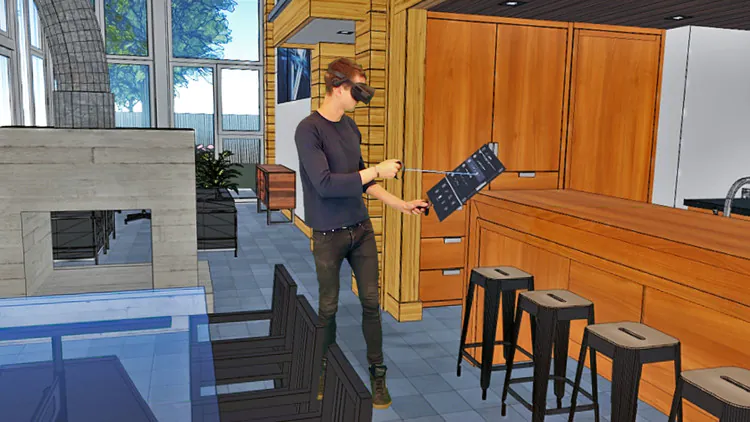
Revolutionizing 3D Design: Virtual Reality for Creating 3D Models
Step into the future of design. The traditional confines of a 2D screen are rapidly being replaced by the boundless, three-dimensional canvas of virtual reality. Virtual reality for creating 3D models isn't just a futuristic concept; it's a transformative reality, fundamentally reshaping how designers, engineers, and artists approach digital sculpting and spatial design. This comprehensive guide will explore how VR empowers creators to build, manipulate, and experience their 3D models with unparalleled intuition and immersion, unlocking new levels of creativity and efficiency in the immersive design workflow.
The Paradigm Shift: Why VR for 3D Modeling?
For decades, 3D modeling has been tethered to the mouse, keyboard, and flat monitor. While powerful, this setup inherently creates a disconnect between the designer and the three-dimensional object they are trying to create. Virtual reality shatters this barrier, offering a truly intuitive and spatial approach to design that mirrors how we interact with objects in the real world.
Intuitive Interaction and Spatial Understanding
- Natural Gestures: Instead of manipulating a virtual object indirectly with a mouse, VR allows users to grab, push, pull, and sculpt with their hands, using natural gestures that feel incredibly intuitive. This direct manipulation significantly reduces the cognitive load associated with translating 2D inputs into 3D actions.
- Haptic Feedback: Many VR controllers offer haptic feedback, providing tactile sensations that enhance the feeling of interacting with virtual objects. This can simulate the resistance of a material as you sculpt or the click of a button, further bridging the gap between the digital and physical.
- True Scale Visualization: One of the most profound advantages is the ability to view and interact with your 3D model at its true scale. Designing a car, a building, or a piece of furniture in VR means you can walk around it, lean in, and perceive its dimensions and proportions precisely as they would exist in reality. This is invaluable for identifying design flaws or appreciating aesthetic nuances that would be missed on a flat screen.
Accelerated Workflow and Real-Time Iteration
The immersive nature of VR inherently speeds up certain aspects of the design process. Real-time rendering in VR environments means that every change you make is instantly visible in its 3D context, eliminating the need for frequent rendering previews. This immediate feedback loop is critical for rapid prototyping and iteration.
- Rapid Prototyping: Designers can quickly sketch out ideas, sculpt forms, and assemble components in a fraction of the time it would take with traditional methods. The fluid nature of VR tools encourages experimentation and reduces the friction of trying out new concepts.
- Collaborative Design: VR offers unique opportunities for collaborative design. Multiple designers can enter the same virtual workspace, interact with the same 3D model, and discuss changes in real-time, regardless of their physical location. This fosters a highly interactive and efficient design review process, accelerating project timelines.
- Reduced Design Errors: By allowing designers to experience their creations in a fully immersive 3D space, VR helps in identifying ergonomic issues, spatial conflicts, or aesthetic inconsistencies much earlier in the design cycle, significantly reducing costly revisions down the line.
Essential VR Hardware for 3D Creation
To embark on your journey of creating 3D models in virtual reality, the right hardware is paramount. The choice often depends on your specific needs, budget, and the complexity of the models you intend to create.
VR Headsets: Untethered Freedom vs. High Fidelity
- Standalone Headsets (e.g., Meta Quest 3, Pico 4): These offer unparalleled freedom of movement, as they don't require a powerful PC connection. They are excellent for casual sculpting, concept art, and portable design work. While their graphical fidelity might be lower than PC-tethered options, their ease of use and accessibility make them a popular entry point into VR modeling.
- PC-Tethered Headsets (e.g., Valve Index, HP Reverb G2, Varjo XR-3): These headsets connect to a high-end gaming PC or workstation, leveraging its processing power for superior graphics, higher refresh rates, and more precise tracking. They are ideal for professional applications requiring detailed models, complex scenes, and crisp visual fidelity. Headsets like the Varjo XR-3 even offer mixed reality capabilities, blending virtual objects seamlessly with the real world, which is invaluable for industrial design and virtual prototyping.
Controllers and Input Devices: Beyond the Mouse
The standard VR controllers (like the Meta Quest Touch controllers or Valve Index Knuckles) are excellent for general interaction, offering intuitive hand presence and button inputs. However, specialized tools are emerging:
- Hand Tracking: Many modern VR headsets offer controller-free hand tracking, allowing users to use their bare hands to interact with the virtual environment. While still evolving, this technology promises an even more natural and direct sculpting experience.
- Stylus-like Controllers: Some VR modeling software or third-party accessories offer stylus-like controllers that mimic the precision of a pen or brush, ideal for intricate detailing and fine-tuned digital sculpting.
- Haptic Gloves/Suits: For the ultimate immersive and tactile experience, advanced haptic gloves or full-body suits can provide nuanced force feedback and pressure sensations, allowing designers to "feel" the virtual objects they are manipulating. While still largely in the professional or research domain, these hint at the future of ergonomics in VR design.
Top VR Software for 3D Model Creation
The ecosystem of VR 3D modeling software is rapidly expanding, catering to a diverse range of artistic and professional needs. These tools vary significantly in their approach, from intuitive sculpting to precise parametric modeling.
Dedicated VR Sculpting and Modeling Tools
- Gravity Sketch: One of the most popular and versatile VR design tools, Gravity Sketch allows users to create 3D models, sketches, and designs in an intuitive, immersive environment. It supports both organic sculpting and precise curve-based modeling, making it suitable for concept art, product design, and architectural visualization. Its robust export options ensure seamless integration with traditional pipelines.
- Medium by Adobe: A powerful digital sculpting tool, Medium excels at organic and character modeling. It offers a rich set of sculpting brushes, layering capabilities, and a highly responsive voxel-based engine, allowing artists to create intricate details and complex forms with ease.
- MasterpieceVR: This software focuses on artistic creation, offering tools for both 3D sculpting and painting in VR. It's great for concept artists, illustrators, and anyone looking to express their creativity in a volumetric space.
- Oculus Quill / Adobe Quill: Primarily a VR illustration and animation tool, Quill allows artists to create expressive 3D drawings and scenes that feel like they've leaped off the canvas. While not a traditional modeling tool, it offers a unique approach to volumetric art creation.
VR Integration in Traditional CAD and DCC Software
Many industry-standard CAD tools and Digital Content Creation (DCC) applications are increasingly incorporating VR functionalities, allowing users to leverage the benefits of immersion without abandoning their established workflows.
- Blender VR: While Blender doesn't offer full VR modeling capabilities natively, community add-ons and integrations allow for VR scene inspection, layout, and even some basic manipulation. This allows artists to review their asset creation in a true 3D space. (Explore more about Blender's VR capabilities for design review and visualization.)
- Autodesk VRED / Navisworks: These professional visualization and design review tools from Autodesk are heavily utilized in automotive, architectural, engineering, and construction (AEC) industries. They allow teams to load complex CAD models into VR for immersive design review, clash detection, and collaborative decision-making, offering a powerful platform for virtual prototyping.
- SketchUp Viewer for VR: For architects and interior designers, SketchUp Viewer enables clients and designers to walk through architectural models in VR, providing an unparalleled sense of scale and presence.
Immersive CAD and Engineering Solutions
Beyond artistic sculpting, VR is making significant inroads into precision engineering and industrial design.
- IrisVR Prospect / Sphere: These platforms focus on immersive design review for architecture, engineering, and construction (AEC) projects. They allow users to import BIM/CAD models and conduct walkthroughs, collaborate with teams, and identify issues in a shared VR environment.
- Varjo XR-3 with CAD integrations: High-end headsets like the Varjo XR-3, combined with specialized software, offer pixel-perfect mixed reality experiences for industrial designers. This enables them to overlay digital prototypes onto physical objects, making precise adjustments and performing detailed design reviews in a photorealistic environment.
The Workflow: From Concept to Creation in VR
Transitioning to VR for 3D modeling involves adapting to a new spatial workflow. Here's a general overview of the process:
Setting Up Your Virtual Workspace
- Physical Space Preparation: Ensure you have adequate clear space to move around safely, especially if using room-scale VR.
- Hardware Setup: Install and calibrate your VR headset and controllers according to manufacturer instructions. Ensure your PC (if tethered) meets the software's requirements.
- Software Launch: Open your chosen VR modeling application. Most will guide you through an initial tutorial to familiarize you with the controls and basic interactions.
- Virtual Environment Customization: Many VR tools allow you to customize your virtual workspace, choosing different backdrops, grids, or even importing reference images to work alongside.
Core Modeling Techniques in VR
- Volume Sculpting: Similar to working with digital clay, tools like Medium and MasterpieceVR allow you to add and subtract material, smooth surfaces, and sculpt organic forms intuitively.
- Surface Modeling / Primitive Manipulation: Gravity Sketch, for example, excels at creating surfaces from curves or manipulating basic geometric primitives (cubes, spheres, cylinders) to build more complex objects. You can stretch, scale, rotate, and combine these elements with ease.
- Curve Drawing: Many VR tools allow you to draw curves directly in 3D space, which can then be extruded, revolved, or used as guides for other operations, ideal for technical drawings or precise outlines.
- Layering and Grouping: Just like in traditional software, you can organize your model into layers or groups, allowing for non-destructive editing and easier management of complex scenes.
Exporting and Integration with Traditional Pipelines
Once your 3D model is complete in VR, it's crucial to be able to export it for further use in other applications or for production. Most VR modeling software supports standard 3D file formats:
- OBJ (Wavefront Object): A widely supported format for 3D geometry and basic material information.
- FBX (Filmbox): A proprietary Autodesk format, very common in game development and animation, supporting geometry, materials, animations, and rigging.
- GLTF (GL Transmission Format): An open standard for 3D scenes and models, increasingly popular for web-based 3D and real-time applications due to its efficiency.
- STL (Stereolithography): Primarily used for 3D printing.
After export, your VR-created model can be brought into traditional DCC software like Blender, Maya, 3ds Max, or CAD tools like SolidWorks for further refinement, texturing, rigging, animation, rendering, or manufacturing preparation. This seamless integration ensures that VR is not a siloed creative space but an accelerator within a broader production pipeline, enhancing the overall asset creation process.
Benefits and Challenges of VR 3D Modeling
While the advantages are compelling, it's important to acknowledge both the strengths and current limitations of using VR for 3D model creation.
Key Advantages
- Enhanced Spatial Awareness: The most significant benefit, leading to more accurate and intuitive design.
- Intuitive Workflow: Direct manipulation reduces the learning curve for basic operations and speeds up complex ones.
- Faster Iteration: Real-time feedback and easy manipulation allow for quick changes and explorations.
- Collaborative Design: Enables geographically dispersed teams to work on models together in a shared virtual space.
- Reduced Cognitive Load: By working directly in 3D, designers spend less mental energy translating 2D screen interactions into 3D concepts.
- New Creative Possibilities: VR allows for organic, freeform sculpting and design approaches that are difficult or impossible with traditional tools.
Overcoming the Hurdles
- Hardware Cost: High-end VR setups can be expensive, though more affordable standalone options are making VR more accessible.
- Learning Curve: While intuitive for some tasks, mastering the advanced features of VR modeling software still requires dedication.
- Motion Sickness: Some users may experience discomfort, though hardware improvements and software design are constantly mitigating this. Taking breaks and starting with less intense experiences can help.
- Precision Limitations: For highly technical or parametric modeling requiring extreme precision (e.g., engineering parts with exact dimensions), traditional CAD tools still often offer superior control, though VR is advancing rapidly in this area.
- Physical Fatigue: Extended VR sessions can lead to physical fatigue in arms and shoulders due to holding controllers and gesturing. Ergonomic considerations are important.
The Future of Immersive 3D Creation
The trajectory of virtual reality for creating 3D models is one of rapid innovation. We are just scratching the surface of what's possible.
- Advancements in Haptics: Expect more sophisticated haptic feedback gloves and suits that allow designers to truly "feel" the textures and resistances of virtual materials, enhancing the fidelity of the creative process.
- AI-Powered Generative Design: The integration of artificial intelligence will allow designers to generate complex forms and optimize designs based on parameters directly within VR, accelerating the prototyping phase.
- Cloud-Based VR Workspaces: Future VR modeling will increasingly leverage cloud computing, allowing users to access powerful modeling capabilities without needing high-end local hardware, fostering even greater collaboration and accessibility. This is a significant step towards true spatial computing.
- Mixed Reality Blending: The lines between VR and AR (Augmented Reality) will blur further, enabling designers to seamlessly switch between fully immersive virtual environments and overlaying their digital creations onto the real world, facilitating real-world scale design and iteration.
- Direct-to-Manufacture Workflows: As VR modeling tools become more precise, we may see direct pathways from VR design to 3D printing or CNC machining, further streamlining the product development cycle.
The shift towards VR in 3D modeling isn't just about new tools; it's about a new way of thinking, interacting, and creating. It promises a future where design is more intuitive, collaborative, and deeply immersive than ever before.
Frequently Asked Questions
Is virtual reality good for creating 3D models?
Yes, virtual reality is exceptionally good for creating 3D models, especially for tasks requiring intuitive interaction, spatial understanding, and rapid prototyping. It allows designers to sculpt, manipulate, and view models at true scale in a fully immersive environment, which can significantly accelerate the creative process and improve design quality. While traditional software still excels at highly technical, precision-driven CAD work, VR offers unparalleled advantages for organic modeling, conceptual design, and collaborative design review.
What software is best for 3D modeling in VR?
The "best" software for 3D modeling in VR depends on your specific needs. For intuitive digital sculpting and concept art, Gravity Sketch and Adobe Medium are top choices. Gravity Sketch is versatile for both organic and hard-surface modeling, while Medium excels at high-detail sculpting. For artistic illustration and animation in 3D, Oculus Quill (now Adobe Quill) is highly regarded. For professional architectural and engineering design review, tools like Autodesk VRED and IrisVR Prospect offer robust solutions. Many traditional DCC tools like Blender are also integrating VR capabilities for viewing and minor adjustments.
Can I create professional 3D models using VR?
Absolutely. Many professionals are already using VR for various stages of their 3D modeling workflow. While some highly technical or parametric modeling tasks might still be more efficient in traditional CAD tools, VR is increasingly used for concept design, rapid iteration, virtual prototyping, and collaborative design review in industries like automotive, architecture, product design, and game development. The models created in VR can be exported in standard formats (OBJ, FBX, GLTF) and seamlessly integrated into traditional pipelines for further refinement, texturing, and rendering.
What are the main benefits of using VR for 3D design compared to traditional methods?
The main benefits of using VR for 3D design include significantly enhanced spatial awareness, allowing designers to perceive depth and scale naturally. It offers a more intuitive and direct manipulation workflow using hand gestures, reducing the need for abstract mouse and keyboard commands. VR facilitates faster iteration and prototyping due to real-time feedback and easy modifications. Furthermore, it enables powerful collaborative design sessions where multiple users can interact with the same model in a shared virtual space, improving communication and decision-making.
Do I need powerful hardware to use VR for 3D modeling?
For professional-grade 3D modeling in VR, especially with complex models or high-fidelity visuals, you generally need powerful hardware, including a high-end PC-tethered VR headset and a robust graphics card (e.g., NVIDIA RTX 3070 or equivalent/higher) and processor. However, more accessible standalone VR headsets like the Meta Quest series can handle simpler digital sculpting and concept design tasks without a PC, making VR modeling more approachable for beginners or less demanding projects. The specific hardware requirements will depend heavily on the chosen VR modeling software and the complexity of your intended designs.

0 Komentar